
 Text rendering
Overview
MOSS-Image is an open-source text-to-image model family from OpenMOSS for illustrations, posters, infographics, and photorealistic imagery. Alongside natural-language prompts, it accepts JSON descriptions of objects, visible text, and their spatial positions, giving creators control over both scene content and composition.
The family uses a 5B backbone and supports input prompts of up to 4K tokens. MOSS-Image-Base is the foundation model, while MOSS-Image-SFT is fine-tuned from Base on curated data. Code and model weights are publicly available, with Python and Gradio interfaces and community integrations for deployment and fine-tuning.
| Model | Description |
|---|---|
| MOSS-Image-Base | The foundation text-to-image model for generation and further fine-tuning. |
| MOSS-Image-SFT | A variant fine-tuned on curated data; the example below illustrates its text grouping and layout. |
Capabilities
Render text within images
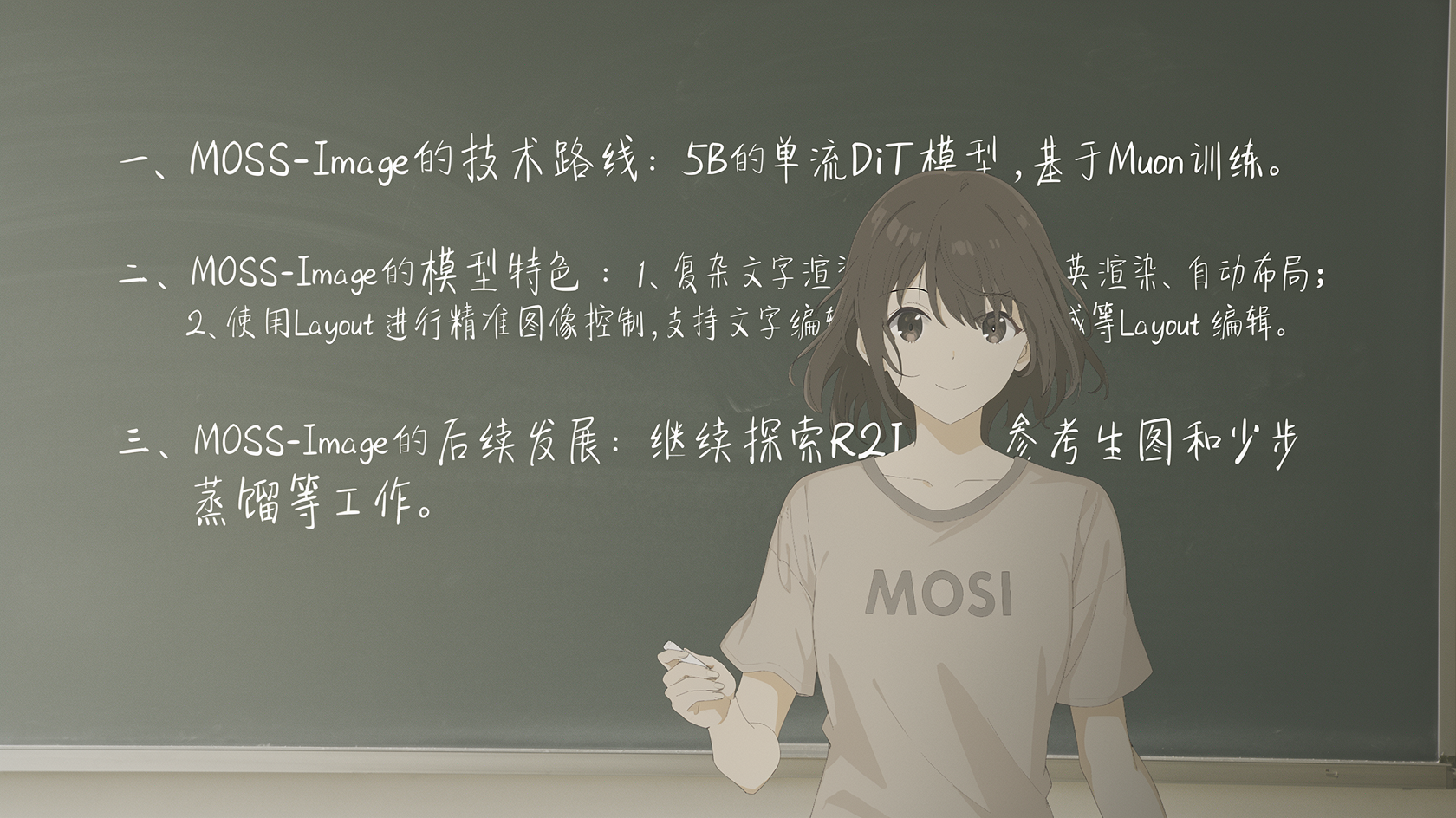
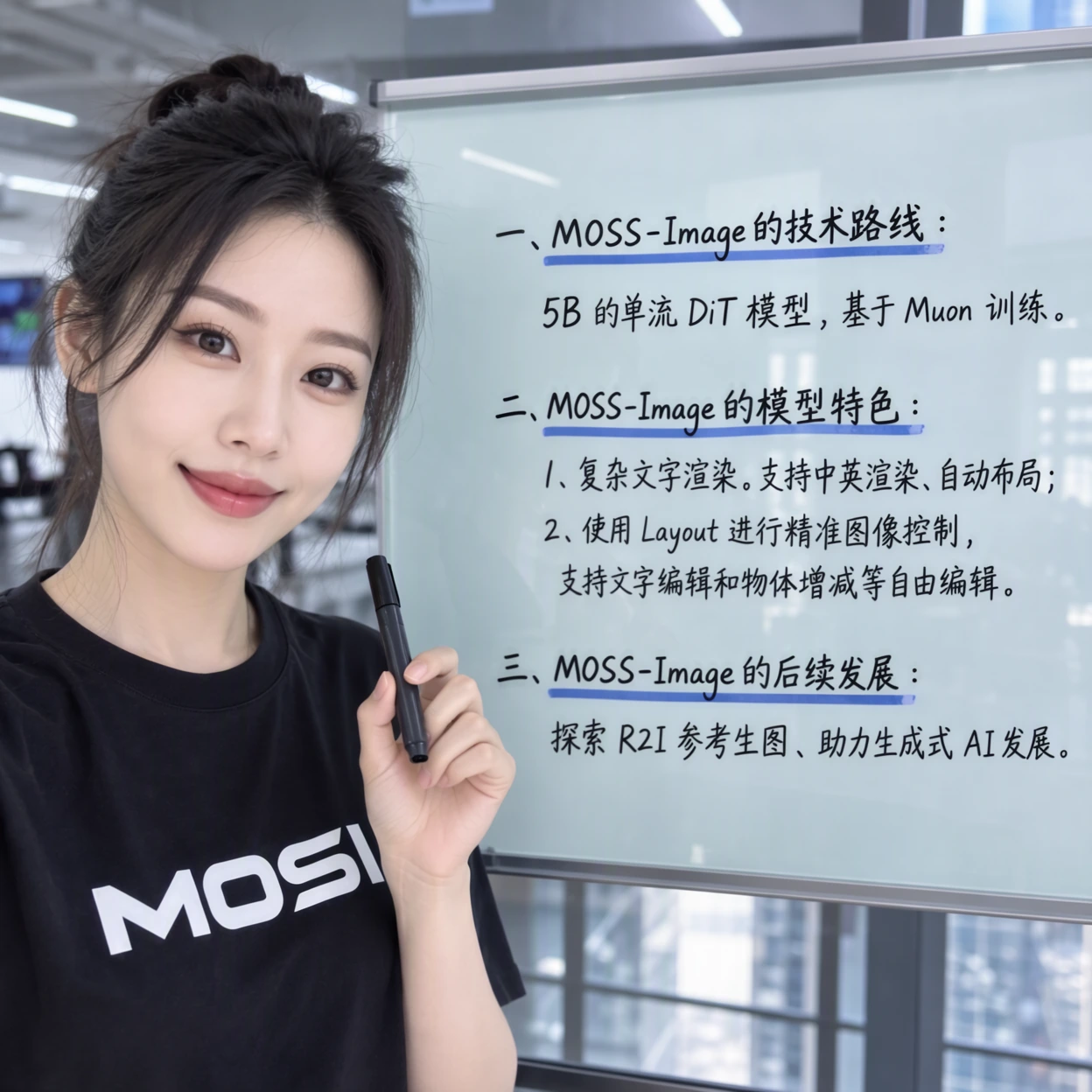
Render Chinese and English text as part of a scene, including headings, paragraphs, handwritten notes, and board writing. Specify visible text and line breaks in the prompt to create posters, illustrated content, and images that combine text with visual elements.
Control object and text placement
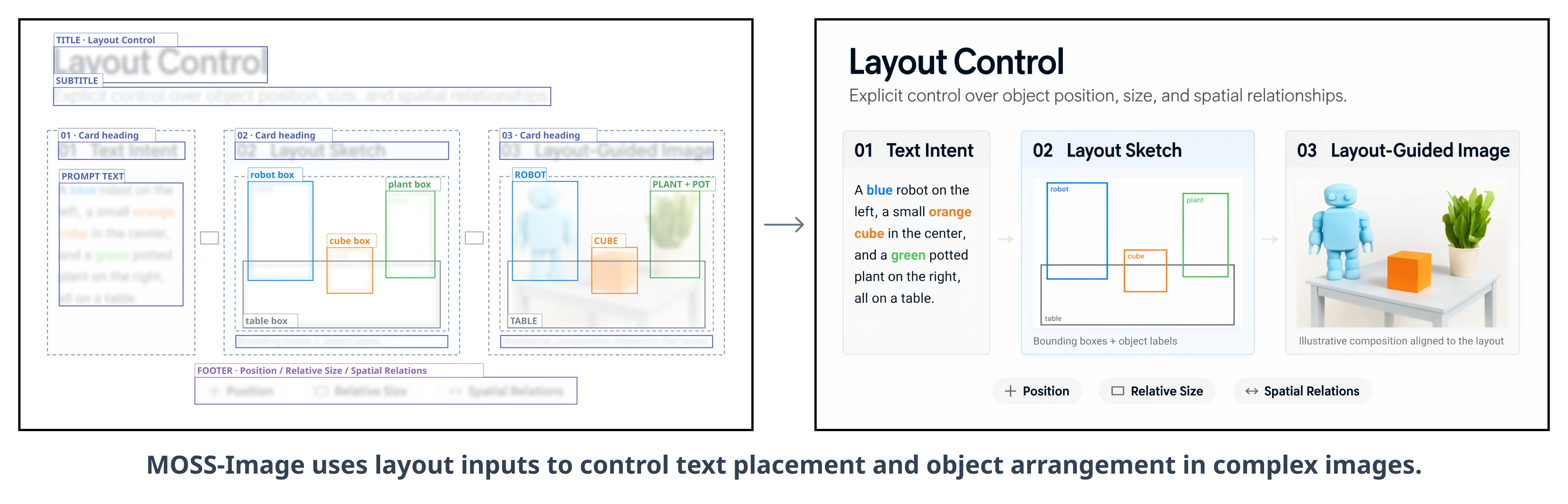
Use structured Layout prompts to describe objects, text, and bounding boxes, specifying positions and spatial relationships. This is useful for posters, infographics, and compositions with multiple elements that require an explicit layout. Inputs are text and JSON layout descriptions.
Work with detailed prompts
Prompts of up to 4K tokens can describe subjects, backgrounds, materials, lighting, style, and visible text in a single input, providing detailed direction for complex scenes.
Explore diverse visual styles
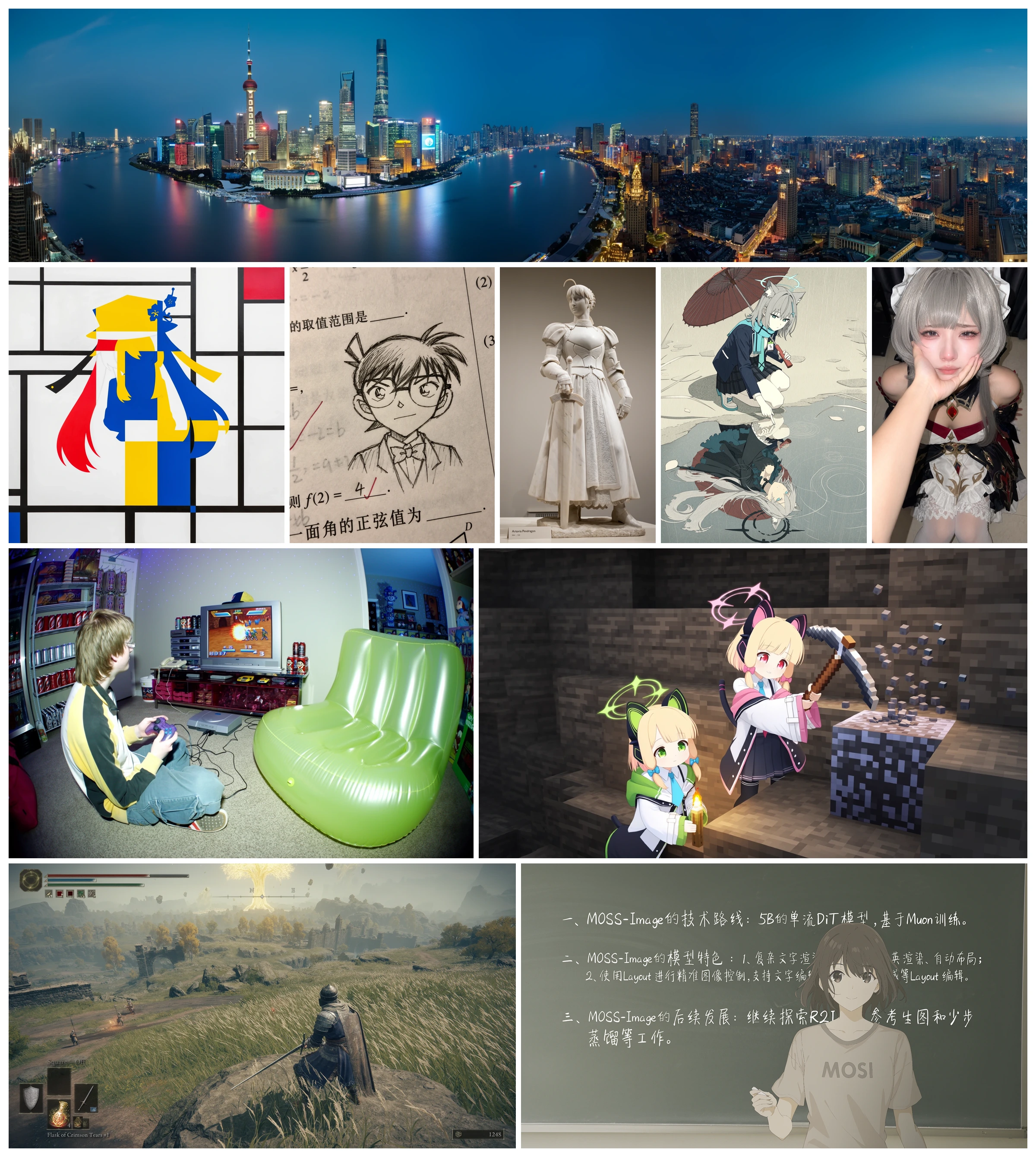
Explore anime, photorealistic imagery, sketches, and graphic design for character illustrations, scene concepts, cityscapes, and posters. The examples below show a range of aspect ratios and visual treatments.
Deploy and adapt
Model weights are released under Apache-2.0. In addition to the repository's Python and Gradio interfaces, community integrations are available for SGLang, vLLM-Omni, and ComfyUI. KohakuMoss (Kohaku) supports full fine-tuning and LoRA training for both Base and SFT.
Evaluation
Long-text rendering
On LongLongTextBench, MOSS-Image achieves 96.3% mean text coverage (Mean-6), ranking first among the evaluated open-weight models. Coverage reaches 97.1% for the longest English texts and 92.4% for the longest Chinese texts.
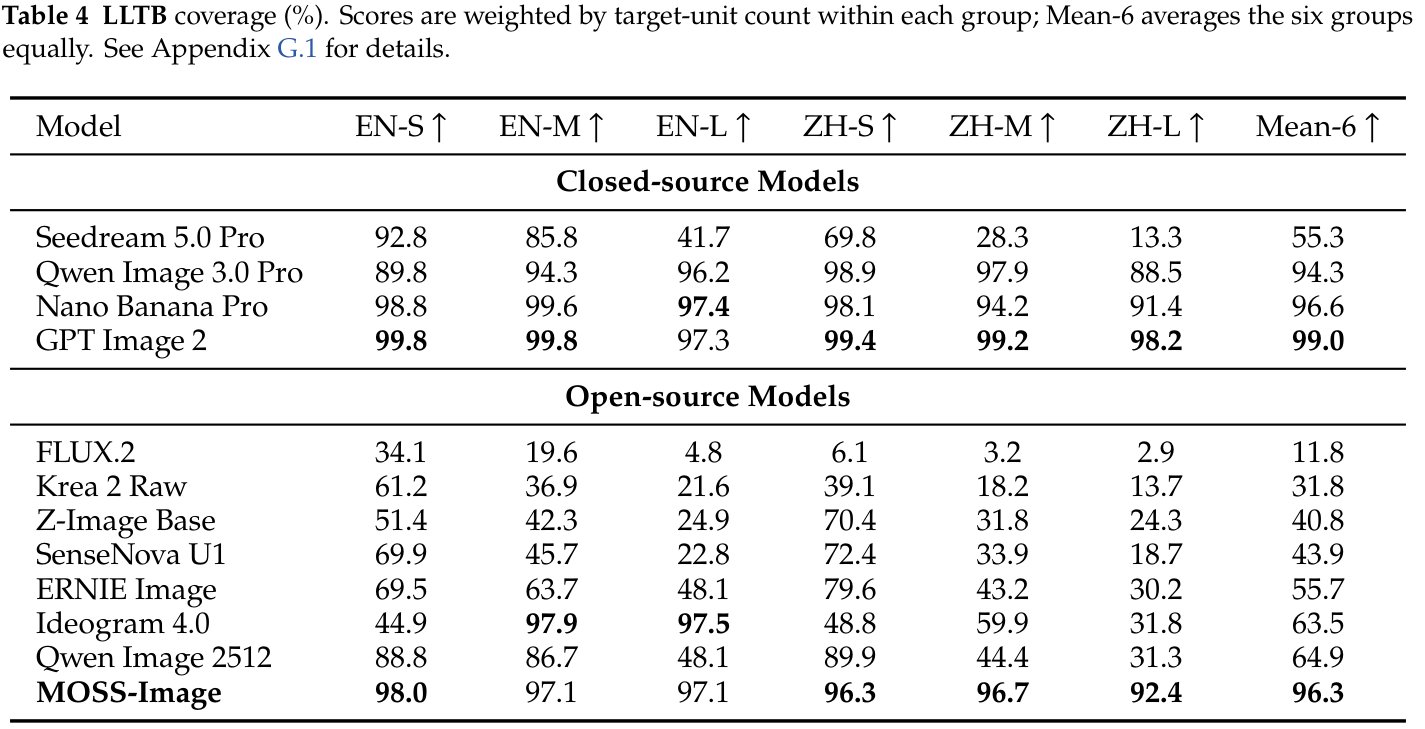
LLTB text coverage (%); higher is better. — Table 4
Layout control
On 7Bench, MOSS-Image achieves 0.88 mean IoU over detected objects (mIoU_det) and 0.70 Layout AUC, leading the evaluated models on both metrics.
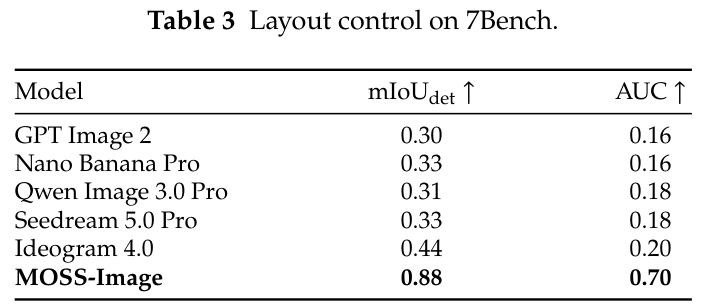
7Bench layout control; higher is better for both metrics. — Table 3
Real-world design tasks
RealLayoutArena uses blind human comparisons across 61 design tasks covering posters, infographics, and user interfaces.
Shared enhanced prompts
With the same enhanced natural-language prompts, MOSS-Image scores 1807.3 Elo, ranking first among the evaluated generators.
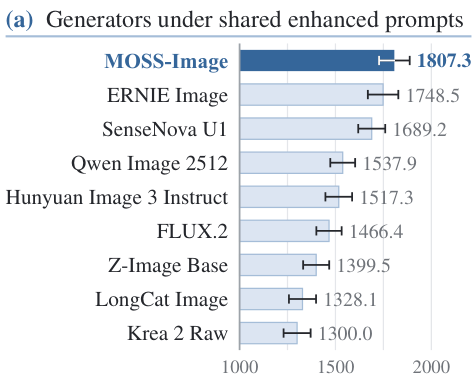
Generator comparison with shared enhanced prompts; error bars show 95% confidence intervals. — Figure 4(a)
End-to-end generation
Combined with GPT-6-based Layout PE, MOSS-Image scores 1698.7 Elo, ranking second among the evaluated end-to-end systems.
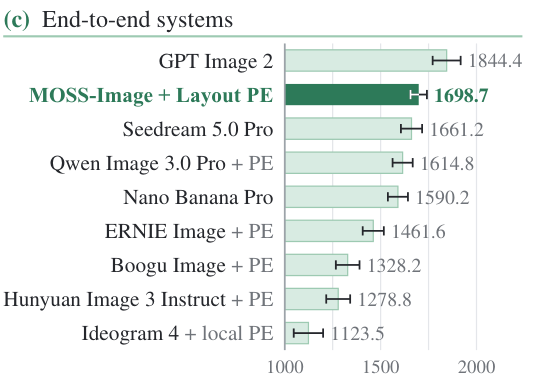
End-to-end system comparison; error bars show 95% confidence intervals. Elo ratings are fitted separately for the two groups. — Figure 4(c)
Source: MOSS-Image Technical Report,Tables 3–4 & Figure 4.
Selected examples
Text rendering
An anime classroom scene with multiple lines of Chinese board writing, illustrating text generation alongside a character and background.
Text rendering example
Layout control
The left panel shows annotated layout boxes and element positions; the right panel shows the corresponding generated composition. The boxes explain the layout constraints.
Layout annotations and generated result
Diverse styles
Generated examples spanning city panoramas, geometric design, sketches, sculpture, anime, and photorealistic scenes.
Visual style showcase
Base and SFT comparison
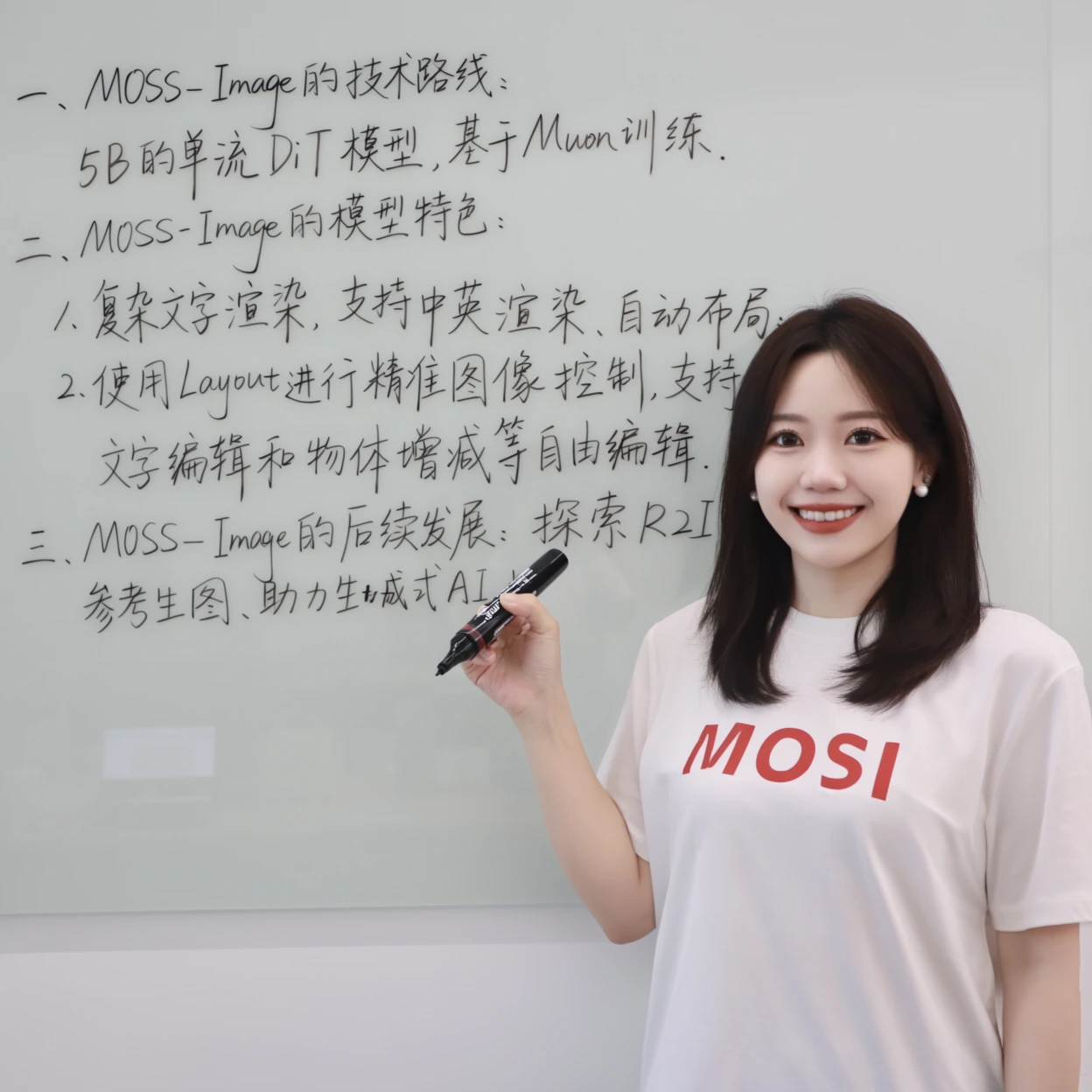
In this whiteboard example, SFT produces clearer text grouping and a more organized layout. The comparison illustrates visual differences in this specific example.
MOSS-Image-Base
MOSS-Image-SFT
Get started
Try your own prompts in the online demo. For local deployment, inference settings, and layout formats, see the English user guide.
Model downloads: ModelScope · Base · ModelScope · SFT
Project page: MOSS-Image
| Tool | Resource |
|---|---|
| SGLang | Inference guide |
| vLLM-Omni | Serving recipe |
| ComfyUI | Plugin and example workflow · Model resources |
| KohakuMoss(Kohaku) | Training framework and documentation |
Technical report and citation
@misc{ai2026mossimagetechnicalreport,
      title={MOSS-Image Technical Report},
      author={MOSI. AI},
      year={2026},
      eprint={2610.23374},
      archivePrefix={arXiv},
      primaryClass={cs.CV},
      url={https://arxiv.org/abs/2610.23374},
}